20051219

PTHPasteboard

I have been bouncing back and forth among pasteboard apps, but I never found one so easy to use (and small too) as PTHPasteboard. And it's FINALLY been updated for Tiger. It records your last 20 (changeable in prefs) items that you copied to your pasteboard, and to paste any item, you just have to go to the menubar window and click on whatever you wanna paste.

It also has an option of saving your pasteboard clippings so they won't be lost if you restart your Mac or if it crashes.

As always, click on the image to see it bigger (don't worry, you can change the ugly colours I have set up on mine).

20051218

Writely - web-based word processor

Writely is not a Mac app, but it is so innovative I had to post about it. It's a web-based word processor you use from your browser. You can create a document there or upload one - HTML files and plain text (.txt), Microsoft Word (.doc), Rich Text (.rtf) and OpenOffice (.odt, .sxw) files smaller than 500K, or Image (.gif, .png, .jpg and .bmp) files smaller than 2Mb. It also exports your docs as PDF.

One of the best features of Writely is that you can send an email invite to someone so that he or she can have access to the documents of your choice and you can both edit it.

PS: Site still does not work in Safari, so use Firefox instead and allow pop ups from the site so it works properly.

Click on the image to see Writely in all its glory:

Textpander - Typing Aid Utility

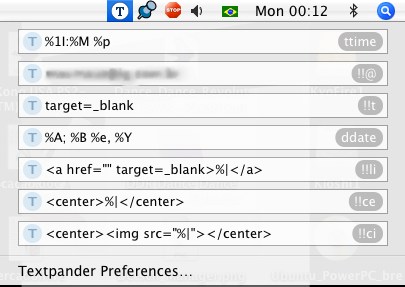
Textpander is a real timesaver for those who do a lot of repetitive typing, like me. for example, everytime I post a link, I just type !!li and it turns into <a href="" target=_blank></a> - and with the cursor in the middle of the tags! Or, if I type ddate (one of the shortcuts that comes default with the software) I get Monday; December 19, 2005.

It is very useful and can be used for complicated and simple tasks. Since I am tired of typing my email in sites for registration, etc, I created a shortcut named !!@ and everytime I type it, my mail appears. Just be sure to read the documentation to get a hold of the variables you can use like the one I use to put my cursor between the html tags and stuff.

Since the main website for the programs has been coming up and down lately, here is another link to download it in some weird language site ;)

Teleport

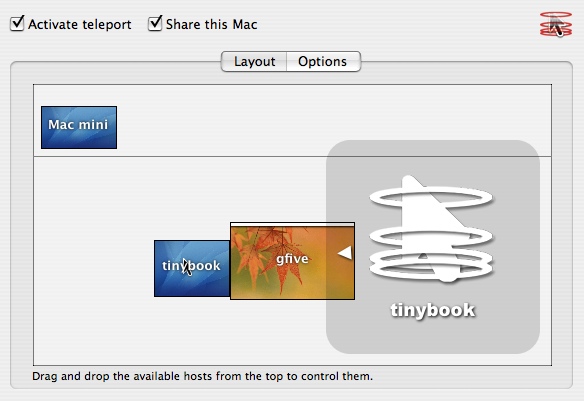
A reader suggested this seemingly amazing utility. Teleport allows you to use the same mouse (and even transfer pasteboard contents) to another Mac. Just drag your mouse cursor to the edge of the screen and you will be on you other Mac (or Macs) screen.

I coud not test it because I have only one Mac, but donations are accepted ;)

(click on image to see bigger)

20051215

Movie Time

Movie Time is a small (600k) movie player with subtitle support. It uses the Quicktime engine, so do not expect it to play all your Divx files like these two.

The annoyance is that you have to know the keyboard shortcuts, but for a start, just remember the key 'C' (controls) and 'Apple+,' (preferences) and you will be ok.

I still prefer NicePlayer for QT movies, though.

Osirix: freeware for doctors

Osirix is a free medical image viewer (DICOM images), besides being able to view JPGs, TIFFs, PDFs, etc.
It's one of these programs that would cost over a thousand bucks if it was commercial.
Anyway, you'd better have at least a G4 Mac with 1GB of RAM to use this baby. Check out the plugins section too.

Click on the image to see bigger:

20051214

VLC Media Player and MPlayer OS X

VideoLAN is a video player that, according to people, play everything you want (it's a bit slow on my Mac so I use MPlayer OS X instead). Both feature grat support for Divx and subtitles, well, I use Mplayer to play any video that doesn't work in any other player, I have a much better experience with it than with VLC.

I haven't tested this, but according to this article in macosxhints, VLC even ignores DVD regions so you can play any DVD on your Mac without the hardware limit of region-changing.

I'll put a post on useful utilities for extracting, removing regions and compressing DVDs soon.

20051212

Planeshift - free MMORPG

For a free game, Planeshift seems to have great visuals (nothing comparable to World of Warcraft, of course) - but if the gameplay is as addicting as most Massively Multiplayer Online Role Playing Games, it may be the cheapest way to throw your life away for some weeks, months or years ;)

Click on the thumbnail to see a screenshot:

Free Image Hosting at www.ImageShack.us

FFView - Quick Image viewing

Any Windows user (or ex-Windows users like me) misses an image viewer as simple and as fast as the old versions of ACDSee (then it became a bloated package, and the Mac version sucks big time). Enter FFView, a great utility for quick and dirty image viewing via thumbnails, lists, etc. They even say thety were inspired by ACDSee 2.x. FFView also reads CBR and CBZ comic book files, but IMHO, Jomic (see previous post) does that better.

Jomic - for comic book fans

Jomic is a great Java (Java = CPU hog) Open Source program that allows you to read those .CBR and .CBZ comic book files. It's very well done and works smoothly, albeit a bit slow (Java, again) - but overall it's a good app.

The only feature I miss is having a 'hand' option to drag the comic (like in PDF readers) - my Microsoft Mouse scrolls vertically and horizontally, so it's no biggie for me, but I hope they implement it. If you are a comic book lover, it's a must get.