

20060314
Freewaremac has a new home!
Yep, now I am posting at freewaremac.net. Please note that the RSS feed has changed the address to http://feeds.feedburner.com/FreewareMac.
Cheers!
Cheers!
20060311
Safaricon - pimp your Safari
Give your Safari 'da look' with Safaricon. The themes do not change the browser's look wildly like Firefox Themes, but they're pretty nice (some of them). And the download is worth alone by the app's replacement of the useless 'Report Bug' button with a very useful 'New Tab' button.
Disable Safari Download Warning
Hooray! Finally a free way to disable Safari's super annoying Download Warnings (ya know, the dialog you get 'this may contain an application, do you really want to download it?'.
I HATE it. The only way to disable it until now AFAIK was with the (great) shareware program Saft, but now Safari Enhancer does it for free. Safari Enhancer also allows you to adjust various setting in Safari, though mine behaves weirdly if I disable the cache. Since you're gonna download it anyway, check the link for the full app's function list.
I HATE it. The only way to disable it until now AFAIK was with the (great) shareware program Saft, but now Safari Enhancer does it for free. Safari Enhancer also allows you to adjust various setting in Safari, though mine behaves weirdly if I disable the cache. Since you're gonna download it anyway, check the link for the full app's function list.
iPod Hi-Fi review
Well although it is very expensive and I criticized its price quite harshly in a previous post, the iPod Hi-fi might just be worth the price for you rich kiddos since it seems potent enough to fill up an entire room with sound (party time!), though it lacks a bit of treble detail, something I value highly, but I know most people love powerful woofers, so check out this comparison review.
20060303
FlashMount - mount images in a second.
With FlashMount, you can mount disk images in a second. It does not verify the image and it automatically accepts user agreements, so you can have any disk image (mainly .DMG files) opening almost instantly.
I used 'Get Info' for a DMG file, changed all DMG file types to open with FlashMount and voilà!
Images opening FAST. Loved this app, only 167K.
I used 'Get Info' for a DMG file, changed all DMG file types to open with FlashMount and voilà!
Images opening FAST. Loved this app, only 167K.
20060302
Freewaremac needs your help!
Yeah, it's time to get a domain, I guess. I'm not fond of this blogspot thingie, so I need your help!
1) I need a suggestion for a domain name;
2) Donations are accepted - click the button to donate 1 Dollar if you found this site of any use, or if you feel like it, whatever, you know the whole 'please donate' speech:
I'd really love a domain name suggestion... If you leave it in the comments, it will get to my mail.
Cheers!
1) I need a suggestion for a domain name;
2) Donations are accepted - click the button to donate 1 Dollar if you found this site of any use, or if you feel like it, whatever, you know the whole 'please donate' speech:
I'd really love a domain name suggestion... If you leave it in the comments, it will get to my mail.
Cheers!
ImageWell - best freeware simple image editor available
 Ok, this is da bomb in simple image editing:
- Watermark your images;
- Crop, Resize, Rotate, etc;
- Send it to your .mac account or any other FTP server;
- 467 Kbytes and free;
- and some other stuff, but I pretty much think I've convinced you already.
Ok enough, go download it, man. Don't even argue with me. It's an order.
20060301
Unpacking and Creating RAR files on Mac OS X
RAR files are a files that have been compressed with the RAR engine, a proprietary format (ya know, like .SIT format). Since I've seem in forums around the net that even Windoze users have problems dealing with RAR files, I imagine many Mac users do too.
I've tested all the freeware solutions to unpack .RAR files, and the only one that always works is UnrarX. Don't forget to check if your RAR file is password protected, because the program asks for it in the beginning but if you ignore that, it will try to unpack the file anyway and only give a message error in the end.
Creating a .RAR file is usually reserved to shareware applications, even on Windows. The only app that does it for free is Gumby, as far as I know (and after a lot of researching). Gumby is a great utility that does so many things you'll have to download the manual (it's a PDF in the main page - there's a link) to learn all about it. To create a .RAR file, just go to the 'RAR' tab and press Alt (Option), and the button will change from 'Process' (for unpacking files) to 'Create'.
I've tested all the freeware solutions to unpack .RAR files, and the only one that always works is UnrarX. Don't forget to check if your RAR file is password protected, because the program asks for it in the beginning but if you ignore that, it will try to unpack the file anyway and only give a message error in the end.
Creating a .RAR file is usually reserved to shareware applications, even on Windows. The only app that does it for free is Gumby, as far as I know (and after a lot of researching). Gumby is a great utility that does so many things you'll have to download the manual (it's a PDF in the main page - there's a link) to learn all about it. To create a .RAR file, just go to the 'RAR' tab and press Alt (Option), and the button will change from 'Process' (for unpacking files) to 'Create'.
Keeping Gmail open all the time / Sunrise Browser
Since I love Gmail and I keep it open all the time, I use the lightest browser I can to keep a window opened with it so it won't affect my CPU's performance.
My browser of choice for that is Sunrise Browser (I've posted about it in this link). It uses Safari's Webkit engine. So Gmail's built-in chat won't work too, but for me, that's less annoyance.
Just make sure you access your Gmail using the URL http://mail.google.com/gmail?nocheckbrowser - or Gmail will be loaded in HTML mode (for theoretically unsupported browsers), which sucks big time.
Update: I was just going to complain that it's a pity Sunrise Browser seemed dead, but it has been recently updated. Go take a look!
My browser of choice for that is Sunrise Browser (I've posted about it in this link). It uses Safari's Webkit engine. So Gmail's built-in chat won't work too, but for me, that's less annoyance.
Just make sure you access your Gmail using the URL http://mail.google.com/gmail?nocheckbrowser - or Gmail will be loaded in HTML mode (for theoretically unsupported browsers), which sucks big time.
Update: I was just going to complain that it's a pity Sunrise Browser seemed dead, but it has been recently updated. Go take a look!
New Apple Products
Well, of course you already know about this if you're a hardcore Mac user, but it's news worth mentioning:
1) New Mac Mini: w00t! Now with Intel Core Solo and Duo processors! Don't ever buy a G-something Mac now, who knows when support for them will be dropped. I am worried (I have an olde iMac G3 DV SE 400 MHz - well here in Brazil, Macs are imported so they cost a *lot*, and I can't stand Windows anymore. I'm not a PC or Microsoft hater, I just hate using it).
2) iPod Hi-Fi - a steal (literally, Apple is putting its hand in your pocket) at USD 349. Just go look for similar solutions from good manufacturers (I'll post a link when I find one, have seem so much, but nothing comes to mind right now).
3) iPod Leather Cases - at USD 99, you'd better order one from the most luxurious casemaker, Vajacases. Top notch Argentina leather and fully customizable. And your girlfriend will love their new iPod Nano Crystal Case.
So, in the opinion of this humble Blogger who cannot afford even a Mac Mini (because they cost more than a 3.0 GHz Pentium IV here, and I cannot live without OS X), it's the only new product worth shelling cash out for (the new Mac Mini).
1) New Mac Mini: w00t! Now with Intel Core Solo and Duo processors! Don't ever buy a G-something Mac now, who knows when support for them will be dropped. I am worried (I have an olde iMac G3 DV SE 400 MHz - well here in Brazil, Macs are imported so they cost a *lot*, and I can't stand Windows anymore. I'm not a PC or Microsoft hater, I just hate using it).
2) iPod Hi-Fi - a steal (literally, Apple is putting its hand in your pocket) at USD 349. Just go look for similar solutions from good manufacturers (I'll post a link when I find one, have seem so much, but nothing comes to mind right now).
3) iPod Leather Cases - at USD 99, you'd better order one from the most luxurious casemaker, Vajacases. Top notch Argentina leather and fully customizable. And your girlfriend will love their new iPod Nano Crystal Case.
So, in the opinion of this humble Blogger who cannot afford even a Mac Mini (because they cost more than a 3.0 GHz Pentium IV here, and I cannot live without OS X), it's the only new product worth shelling cash out for (the new Mac Mini).
20060226
Quicksilver Short Tutorial
Quicksilver is one of the apps I cannot live without (along with PTHPasteboard and Textpander). So, let's go, fellas:
1) Install Quicksilver;
2) Wait 10 minutes or so for it to scan your catalog;
3) Open it using the keyboard shortcut (I use CTRL-Space);
4) Think of the first window as a noun, and the second as a verb. for example, if you type FF and Firefox appears (or if you want Firefox to appear when you type FF, just scroll down the results list and Quicksilver will learn it after you do it one or two times);
5) So, for an app, the second window (verb/action) will show what you can do with it. Naturally the default action will be 'Open' for an application, but you can right click on the second (Action) window and there will be things like 'Show in Finder' and whatnot;
6) If you've allowed QS to scan your address book, the actions will be different, like send mail, show in address book... You can even click the actions window and type 'email' for example, and it will show you some 'hidden' actions (not on the menu) like 'send mail directly' - then a third window will appear, and if you press the dot key you can write what you want and send it without opening your mail program;
7) The dot key is very useful in any window. If you press dot on the first window and type any e-mail address, you can send a mail via the same procedures described in item #6. Or type a URL, you can copy it, open in the browser, well, you get the idea.
This is the type of Application you learn something every day. Sometimes I can't find something using QS (because I didn't set it to scan all my folders) and it takes me some seconds to remember that Spotlight exists.
There are many plugins too - for Cyberduck, Terminal, iTerm, Mail, Automator, iPhoto... Too many to list. And the app's appearance is highly customizable.
I've barely scratched the surface of this app with this post. Take a look at 43 folder's Quicksilver category and you will see what I mean (and keep clicking on 'Previous Posts', there are several pages).
1) Install Quicksilver;
2) Wait 10 minutes or so for it to scan your catalog;
3) Open it using the keyboard shortcut (I use CTRL-Space);
4) Think of the first window as a noun, and the second as a verb. for example, if you type FF and Firefox appears (or if you want Firefox to appear when you type FF, just scroll down the results list and Quicksilver will learn it after you do it one or two times);
5) So, for an app, the second window (verb/action) will show what you can do with it. Naturally the default action will be 'Open' for an application, but you can right click on the second (Action) window and there will be things like 'Show in Finder' and whatnot;
6) If you've allowed QS to scan your address book, the actions will be different, like send mail, show in address book... You can even click the actions window and type 'email' for example, and it will show you some 'hidden' actions (not on the menu) like 'send mail directly' - then a third window will appear, and if you press the dot key you can write what you want and send it without opening your mail program;
7) The dot key is very useful in any window. If you press dot on the first window and type any e-mail address, you can send a mail via the same procedures described in item #6. Or type a URL, you can copy it, open in the browser, well, you get the idea.
This is the type of Application you learn something every day. Sometimes I can't find something using QS (because I didn't set it to scan all my folders) and it takes me some seconds to remember that Spotlight exists.
There are many plugins too - for Cyberduck, Terminal, iTerm, Mail, Automator, iPhoto... Too many to list. And the app's appearance is highly customizable.
I've barely scratched the surface of this app with this post. Take a look at 43 folder's Quicksilver category and you will see what I mean (and keep clicking on 'Previous Posts', there are several pages).
SimpsonBot
I'm on a roll today, can't stop blogging ;)
Well, most of you know this widget, but I'm posting this because everybody should have this <l33t mode>'cos itz da w00test widget evarz!!!!</l33t mode>
How SimpsonBot works:
Click on the character's face and you'll get another quote from him. Click on the Simpsons logo and you change the character to get his/her quotes. It's awesome!
There's a Family Guy version on the site too, but I hate Family Guy. I realize you Americans love it, but that may be exactly the reason that I hate it: I find its humour to be too American (not that I'm against people from USA or any other country, I'm just talking about a cartoon, jeez). I am Brazilian, by the way.
Also, get the DashTunes Widget while you're there too. It's a much-improved built-in iTunes controller, allowing you to search songs and rate 'em.
Well, most of you know this widget, but I'm posting this because everybody should have this <l33t mode>'cos itz da w00test widget evarz!!!!</l33t mode>
How SimpsonBot works:
Click on the character's face and you'll get another quote from him. Click on the Simpsons logo and you change the character to get his/her quotes. It's awesome!
There's a Family Guy version on the site too, but I hate Family Guy. I realize you Americans love it, but that may be exactly the reason that I hate it: I find its humour to be too American (not that I'm against people from USA or any other country, I'm just talking about a cartoon, jeez). I am Brazilian, by the way.
Also, get the DashTunes Widget while you're there too. It's a much-improved built-in iTunes controller, allowing you to search songs and rate 'em.
20060225
10 Semi-Obscure Mac Programs You Shouldn't Be Without
Heading East has this interesting list of 10 apps you shoudn't be without. Some of these are shareware though.
Of this list, I love Textpander (I swear, you'll never unisntall this app), Flip4Mac, Growl, Chax and SBook (see descriptions on the link to the post). Instead of JumpCut, I prefer PTHPasteboard (so wonderful, simple and easy to use for multiple clipboards). In the shareware front, I use Saft (It's a great Safari add-on and nothing free comes close to it yet).
Warning: I was going to install AppleJack, listed there, but when reading at the Readme that some Tiger users lost their entire disk because of the app, I gave up.
Of this list, I love Textpander (I swear, you'll never unisntall this app), Flip4Mac, Growl, Chax and SBook (see descriptions on the link to the post). Instead of JumpCut, I prefer PTHPasteboard (so wonderful, simple and easy to use for multiple clipboards). In the shareware front, I use Saft (It's a great Safari add-on and nothing free comes close to it yet).
Warning: I was going to install AppleJack, listed there, but when reading at the Readme that some Tiger users lost their entire disk because of the app, I gave up.
Deactivate your Dashboard
Hate the Dashboard? Prefer Yahoo! Widgets (excellent app by the way, now with a 'Dashboard mode' - press F8 and only your widgets appear onscreen).
So, deactivate it so it won't consume any CPU cycles or memory (it does consume them, even when youdon't open it).
Open Terminal or iTerm and type:
defaults write com.apple.dashboard mcx-disabled -boolean YES
and then:
killall Dock (this reinitilizes your Dock)
To enable the Dashboard back:
defaults write com.apple.dashboard mcx-disabled -boolean NO
killall Dock
So, deactivate it so it won't consume any CPU cycles or memory (it does consume them, even when youdon't open it).
Open Terminal or iTerm and type:
defaults write com.apple.dashboard mcx-disabled -boolean YES
and then:
killall Dock (this reinitilizes your Dock)
To enable the Dashboard back:
defaults write com.apple.dashboard mcx-disabled -boolean NO
killall Dock
Add a Quit Menu to the Finder
Unlike some of you new Mac users might think, the Finder is just another application, it's not like Windoze Explorer.
So, to add a Quit Menu to the Finder (which helps CPU and cleans your Desktop), open Terminal.app (I prefer iTerm - Terminal tab goodness, besides background images, customizable colors and other cool stuff) and then type the following command:
defaults write com.apple.Finder QuitMenuItem 1
You can relaunch the Finder at any time clicking the Dock icon, and quitting Finder doesn't do anything harmful to your system.
So, to add a Quit Menu to the Finder (which helps CPU and cleans your Desktop), open Terminal.app (I prefer iTerm - Terminal tab goodness, besides background images, customizable colors and other cool stuff) and then type the following command:
defaults write com.apple.Finder QuitMenuItem 1
You can relaunch the Finder at any time clicking the Dock icon, and quitting Finder doesn't do anything harmful to your system.
WinOSX Transformation pack
PS: This is for WINDOWS.
WinOSX Transformation Pack makes your Windoze looks just like OS X.
I haven't been able to find any decent screenshot of it, but user feedback (on a Brazilian website I found the proggie) is very positive.
Please submit me a screenshot (800x600 minimum) if you install it.
It requires Windows XP or 2003 and is 30 megabytes in size.
Link for download: WinOSX Transformation Pack
WinOSX Transformation Pack makes your Windoze looks just like OS X.
I haven't been able to find any decent screenshot of it, but user feedback (on a Brazilian website I found the proggie) is very positive.
Please submit me a screenshot (800x600 minimum) if you install it.
It requires Windows XP or 2003 and is 30 megabytes in size.
Link for download: WinOSX Transformation Pack
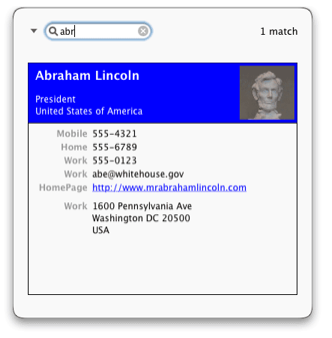
TapDex - 1-click Adress Book search
Suggestions, anyone?
I know I am getting some visits in this blog, so it would be great if you could suggest more freeware in the comments. I receive 'em all in my Mail so no comment will be overlooked.
Thanks ;)
Thanks ;)
ClamXav - free virus scanner
ClamXav is a free virus scanner for Mac OS X. It uses the very popular ClamAV open source antivirus engine as a back end.
Why get an antivirus for Mac OS X? Well, viruses for Mac OS X are appearing now, but they shoudn't even concern us Mac users. But you can be still infected if you use a Pc Emulator such as Virtual PC.
And not being infected does not stop you from spreading virus to other Windoze users. I did a scan on my Home directory and found 6 Windows viruses, which of course won't affect me but I may have helped spread it.
The good thing about this app is that it takes little CPU cycles, so you can scan and do other things (even on my olde iMac G3 it does not get in the way). The bad thing is that it's slow as hell to scan files.
Why get an antivirus for Mac OS X? Well, viruses for Mac OS X are appearing now, but they shoudn't even concern us Mac users. But you can be still infected if you use a Pc Emulator such as Virtual PC.
And not being infected does not stop you from spreading virus to other Windoze users. I did a scan on my Home directory and found 6 Windows viruses, which of course won't affect me but I may have helped spread it.
The good thing about this app is that it takes little CPU cycles, so you can scan and do other things (even on my olde iMac G3 it does not get in the way). The bad thing is that it's slow as hell to scan files.
Subscribe to:
Posts (Atom)